HEIC · HEIF · HEVC still images
Convert HEIC to JPG without uploading anything
Drop HEIC photos here
or click to choose files — as many as you like, no size cap
Your iPhone saves photos as HEIC. Most of the web still wants JPG. Drop the files here and they are decoded and re-encoded inside this browser tab — they never travel to a server, because there is no server to travel to.
- Nothing leaves your device
- No file size limit
- No account, no watermark
- Works offline once loaded
Why your photos are HEIC in the first place
Since iOS 11, iPhones and iPads have defaulted to High Efficiency Image Container files —
.heic on Apple devices, .heif elsewhere. Inside the container is a still
frame compressed with HEVC, the same codec used for 4K video. It is genuinely better compression:
the same photo takes roughly half the storage of the JPG your phone would otherwise have written,
with no visible loss.
The problem is not quality. It is that HEVC is patent-encumbered, so support arrived slowly and unevenly. Windows shipped it behind a paid codec for years. Plenty of web upload forms, print services, insurance portals, university submission systems and older photo software still reject the format outright. That is the moment most people find this page: a file that looks like a photo on the phone and behaves like a broken attachment everywhere else.
What happens when you drop a file here
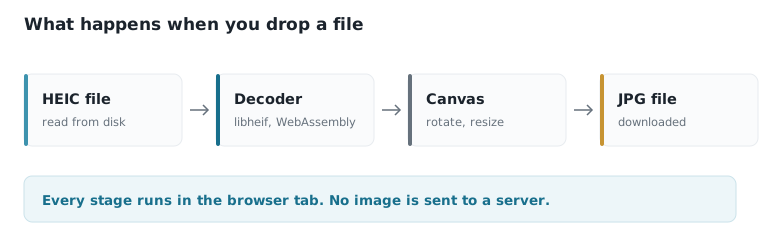
- The container is opened in your browser
A WebAssembly build of the HEIF decoder reads the file and pulls out the primary image — the same one your phone shows you — along with its dimensions and orientation flag.
- The pixels are drawn to a canvas
Rotation is applied so landscape shots do not come out sideways, and transparency is flattened onto white if you are writing JPG, which has no alpha channel.
- A new file is encoded and handed back to you
The browser writes a fresh JPG, PNG or WebP at the quality you chose. You get a Save button, or a single ZIP if you converted a batch. Close the tab and nothing remains.
A note on quality. HEIC and JPG are both lossy, so this is a re-encode, not a lossless rewrite. At 92% quality the difference is invisible at normal viewing sizes. Drop below about 75% and you will start to see blocking in skies and smooth gradients. If you are archiving originals rather than sharing them, keep the HEIC files too — this page explains exactly what is lost.
Every converter on this site
By device
Step-by-step for your setup
If you would rather not use a web tool at all, every one of these guides shows the built-in method for that platform first — Photos, File Explorer, Preview, Google Photos, and only mentions the converter as a fallback.
When something is wrong
HEIC problems, diagnosed
HEIC and JPG, side by side
| Attribute | Keep as HEIC | Convert to JPG |
|---|---|---|
| Storage for 1,000 photos | ~1.6 GB | ~3.2 GB |
| Opens on a Windows PC | Only with a codec installed | Always |
| Accepted by upload forms | Frequently rejected | Effectively always |
| Accepted by print services | Rarely | Yes |
| Survives email attachment | Often shows as broken | Yes |
| Keeps depth and burst data | Yes | No |
That is the practical trade rather than the technical one. HEIC wins on paper at every measure, which is a separate question from whether the file will open when it reaches somebody else. The full comparison covers compression, colour depth and why Apple made the switch.
Ready to convert?
Drag your files onto the tool at the top of this page.
Common questions
- Are my photos uploaded to a server?
- No. The decoder and encoder both run as WebAssembly and JavaScript inside your browser tab. You can confirm it yourself: open your browser's network panel, convert a file, and you will see no upload request. You can also disconnect from the internet after the page loads and the converter will keep working.
- Is there a limit on file size or how many files I can convert?
- There is no limit imposed by this site, because there is no server bandwidth to pay for. The real limit is your device's memory. A few hundred photos at a time is normal on a laptop; on an older phone, batches of twenty to thirty are more comfortable.
- Does converting HEIC to JPG reduce quality?
- Slightly, because both formats are lossy and this is a re-encode. At the default 92% setting the difference is not visible at normal viewing sizes. The bigger change is file size: JPG output is usually larger than the HEIC input, since JPG compresses less efficiently.
- Will my EXIF data and date taken survive?
- The image is re-encoded from decoded pixels, so camera metadata is not carried across. The file's modification date is preserved by your operating system, but shutter speed, lens and GPS tags are not written into the new JPG. If you need EXIF intact, use Apple's own export or a desktop tool.
- Can I convert JPG back to HEIC here?
- Not truly — no browser can encode HEVC still images, because the licensing makes it impractical to ship an encoder. The JPG to HEIC page explains this honestly and shows the two methods that do work, plus AVIF and WebP as modern alternatives that browsers can write.
- Does this work on iPhone and Android?
- Yes. The page works in Safari on iOS and Chrome on Android. On iPhone, files you pick from the Photos app are often already converted to JPG by iOS itself before the browser sees them, which is convenient, but means you may want to use the Files app instead to get the real HEIC.