What is a HEIC file?
A HEIC file is a photo compressed with video technology. That one sentence explains both why it is so much smaller than a JPG and why so little software can open it.
The short definition
HEIC stands for High Efficiency Image Container. It is Apple's name for a file that follows the HEIF standard (ISO/IEC 23008-12) and stores its picture compressed with HEVC, the video codec also known as H.265. Apple made it the default photo format on iPhone and iPad with iOS 11 in 2017.
The insight behind it is simple. Video codecs had improved enormously since JPEG was standardised in 1992, and a still photograph is just a single video frame. Applying thirty years of compression research to a still image roughly halves the file size at the same visual quality.
What is inside the file
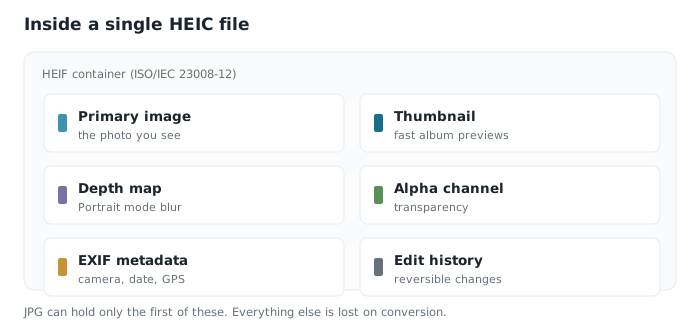
A HEIC is a container, not a single image, and that distinction matters. One file can hold:
- The primary image — the photo you see.
- A thumbnail — a small preview so browsing an album does not require decoding everything.
- Auxiliary images — a depth map for Portrait mode, or an alpha channel for transparency.
- Image sequences — every frame of a burst, in one file.
- EXIF metadata — camera settings, capture time, GPS coordinates.
- Edit history — non-destructive adjustments that can be reversed later.
This is why a Portrait photo can have its background blur adjusted after the fact on an iPhone but not after conversion to JPG. The depth information was in the container, and JPG has nowhere to keep it.
What the extra capacity is used for
Most of what makes HEIC interesting is not the compression but what the container is permitted to carry alongside the photograph. Each of these is a real feature you have probably used without knowing which part of the file made it possible.
| Feature you see | What the container is doing |
|---|---|
| Portrait mode blur you can adjust afterwards | Storing a depth map as an auxiliary image beside the photo |
| Burst shots kept as one item | Holding an image sequence, with one frame flagged as primary |
| Crops and edits you can undo months later | Recording the edit as instructions rather than baking it into the pixels |
| Skies that do not band on a modern display | Carrying 10-bit colour instead of the 8 bits JPG allows |
| Instant album scrolling on a full library | Embedding a small thumbnail so nothing decodes the full image |
| Cut-outs and stickers with clean edges | Keeping an alpha channel, which JPG has no way to store |
JPG can do none of this. It holds one image, eight bits per channel, no transparency and no auxiliary data. If you want the two formats measured against each other on size and quality rather than capability, that comparison lives on its own page.
Why it causes so much trouble
HEVC is patent-encumbered. Several patent pools license it and charge royalties per device or per copy of software. JPEG's patents expired long ago, making it free to implement, which is precisely why it is everywhere.
So browser makers ship HEVC decoders reluctantly or not at all; Microsoft moved the codec into a paid Store package; several Linux distributions leave it out of default installs. The format is not obscure or badly designed. It is licensed in a way that made universal adoption impossible.
AVIF is the answer the industry eventually reached: the same container concept, but using the royalty-free AV1 codec. It is supported in every current browser, which HEIC never was.
Should you keep your photos as HEIC? If they live on Apple devices and in iCloud, yes — you halve your storage for no visible cost. Convert copies when you need to send something outside that world. If you regularly move photos to Windows machines, switching capture to JPG may save you more time than it costs in disk space.
Common questions
- What does HEIC stand for?
- High Efficiency Image Container. It is Apple's file extension for images following the HEIF standard, with the picture data compressed using the HEVC video codec.
- Why did Apple switch to HEIC?
- Storage. HEIC files are roughly half the size of equivalent JPGs at the same visual quality, which meant users could keep twice as many photos on the same device and in the same iCloud plan.
- Is HEIC better than JPG?
- Technically, in every respect that can be measured — compression, colour depth, transparency, HDR. Practically, JPG remains more useful because it opens everywhere and HEIC does not.
- Can I open HEIC files on Windows?
- Yes, with the HEVC codec installed, or with software that bundles its own decoder such as ImageMagick or IrfanView, or through a browser-based viewer that needs nothing installed.