HEIC vs JPG
One format wins on every technical measure. The other wins the only measure that matters when you are trying to send someone a photograph.
Side by side
| Attribute | HEIC | JPG |
|---|---|---|
| Introduced | 2015 (adopted 2017) | 1992 |
| Compression | HEVC intra-frame | JPEG DCT |
| 12 MP photo, typical | 1.6 MB | 3.2 MB |
| Colour depth | 8, 10, 12 or 16-bit | 8-bit only |
| Colour spaces | sRGB, Display P3, Rec.2020 | Any, but 8-bit limits usefulness |
| Transparency | Yes | No |
| HDR | Yes | No |
| Multiple images per file | Yes | No |
| Depth maps | Yes | No |
| Non-destructive edits | Yes | No |
| Universal support | No | Yes |
| Patent status | Encumbered | Expired |
The size difference, concretely
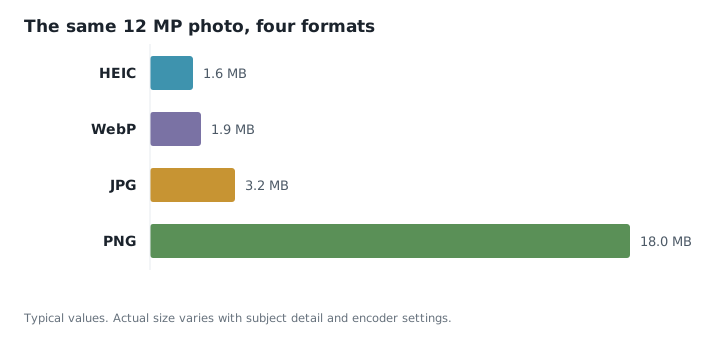
Compression efficiency is the headline claim, and it holds up. For a 12 MP photo at visually equivalent quality, HEIC lands around half the size of JPG. Across a library that compounds:
| Library size | As HEIC | As JPG | Difference |
|---|---|---|---|
| 1,000 photos | 1.6 GB | 3.2 GB | 1.6 GB |
| 5,000 photos | 8 GB | 16 GB | 8 GB |
| 20,000 photos | 32 GB | 64 GB | 32 GB |
Thirty-two gigabytes is the difference between fitting in an iCloud tier and paying for the next one up. That is the entire commercial logic behind Apple's switch.
Is the quality actually better?
At the same file size, yes, and visibly so in the places JPEG struggles — gradients in skies, shadow detail, and areas of subtle texture. JPEG's 8×8 block structure produces the characteristic blocking and mosquito noise around high-contrast edges that HEVC's larger, adaptive blocks avoid.
At high quality settings on a good photograph, the two are hard to tell apart. The gap opens up as you compress harder: a HEIC at 500 KB still looks decent where a JPG at 500 KB is visibly degraded.
Which to use
- Storing photos on Apple devices — HEIC. Half the space, no downside inside that ecosystem.
- Sending to anyone — JPG. The compatibility question overrides everything else.
- Uploading to a website or web form — JPG, unless the site explicitly accepts HEIC.
- Printing — JPG. Most print services reject HEIC outright.
- Editing repeatedly, neither. Use PNG or TIFF as the working format.
- Publishing on a website, neither. Use WebP or AVIF.
The pragmatic setup. Keep HEIC as your capture and storage format, and convert copies to JPG when something needs to leave the ecosystem. You get the storage saving on thousands of files and pay the conversion cost only on the handful you actually share.
Common questions
- Is HEIC or JPG better quality?
- HEIC, at any given file size, particularly in gradients and shadows where JPEG's block structure shows. At high quality settings and generous file sizes the difference becomes hard to see.
- How much smaller are HEIC files?
- Roughly half the size of an equivalent JPG. A 12 MP photo is typically about 1.6 MB as HEIC against about 3.2 MB as JPG.
- Should I convert my whole photo library from HEIC to JPG?
- Usually not. It would roughly double the storage used and gains you nothing until you actually need to share a file. Convert individual photos on demand instead.
- Does converting HEIC to JPG make the file bigger?
- Yes, normally, because JPG compresses less efficiently. Expect the JPG to be around twice the size unless you lower the quality setting or reduce the dimensions.