Does converting HEIC to JPG lose quality?
Yes, but the amount is small and controllable, and it is usually not the thing that makes converted photos look worse.
What happens during conversion
Three steps, each with different implications:
- Decode
The HEVC data is decompressed into raw pixels. This step is exact — the decoder reproduces precisely what the encoder intended. Nothing is lost here.
- Process
Rotation is applied, transparency is flattened if the target is JPG, and the image is resized if you asked for that. Resizing does discard data; rotation by 90° multiples does not.
- Re-encode
A JPEG encoder compresses the pixels again, using a different algorithm with different weaknesses. This is where quality is lost, and how much depends entirely on the quality setting.
So there is one lossy step, not two, and you control it.
How much is actually lost
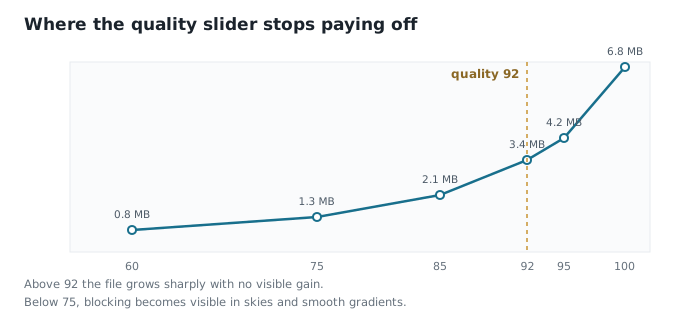
| JPG quality | Size (12 MP) | Visible difference |
|---|---|---|
| 95 | 4.2 MB | None, even at 400% zoom |
| 92 | 3.4 MB | None in normal viewing |
| 85 | 2.1 MB | Slight softening in fine texture |
| 75 | 1.3 MB | Blocking visible in skies |
| 60 | 800 KB | Obvious artefacts |
At 92 the loss is real but not perceptible under any normal viewing condition, including printing at A4. That is why it is a sensible default.
What actually makes converted photos look worse
People report that converted photos look wrong far more often than a well-configured conversion should produce. Compression is usually not the culprit. In order of frequency:
- Colour space handling — a Display P3 photo assigned sRGB instead of converted looks flat and desaturated. This is by far the most common cause and it is much more visible than compression. Diagnosis here.
- Aggressive resizing — a photo downscaled to 800 px and viewed full-screen looks soft because it is soft, not because of the codec.
- Repeated conversion — converting a JPG that was already converted compounds the loss each time.
- HDR tone mapping — a 10-bit HDR source folded into 8-bit SDR loses highlight range, which reads as dull.
- A low default quality setting — many tools default to 75 or 80 without saying so.
When it genuinely matters
- Large prints — anything beyond A3 benefits from the highest quality you can manage.
- Heavy editing afterwards — pushing exposure and contrast amplifies existing artefacts.
- Cropping in hard — a tight crop magnifies compression damage along with everything else.
- Archiving — keep the original HEIC. A converted copy is for use, not for keeping.
For a photo being emailed, posted or viewed on a screen, quality 85–92 is comfortably beyond what anyone will notice.
Common questions
- How much quality is lost converting HEIC to JPG?
- At quality 92 or above, none that is perceptible under normal viewing. The conversion involves a single lossy re-encode, and its severity is controlled entirely by the quality setting.
- Can I convert HEIC to JPG losslessly?
- Not to JPG, since it is a lossy format. Converting to PNG is lossless relative to the decoded image, though it produces files roughly ten times larger and recovers nothing the HEIC discarded.
- Why do my converted photos look washed out?
- Almost always a colour space problem rather than compression. iPhone photos are typically Display P3, and assigning sRGB rather than converting to it desaturates the image noticeably.
- Should I keep the original HEIC files?
- Yes, if storage allows. They are the highest-fidelity version you have and are half the size of the JPGs. Treat converted copies as disposable output rather than replacements.